armi.reactor.locations module
The location module is responsible for identifying the spatial position of objects in the reactor model.
It also contains code useful for traversing regular meshes (hexagons, etc.).
The Location Object
Each ARMI Block (and Assembly) contains a Location object whose purpose it is to identify where in the core the structure resides. Location objects are represented as strings when printed or written because their original primary usage was to be written directly to textual neutronics input files, but they contain much more functionality. An assembly location in ARMI is based on the DIF3D region definition and has a somewhat strange representation for this reason. The coordinate system is counterclockwise spiral, as seen in the figure below.
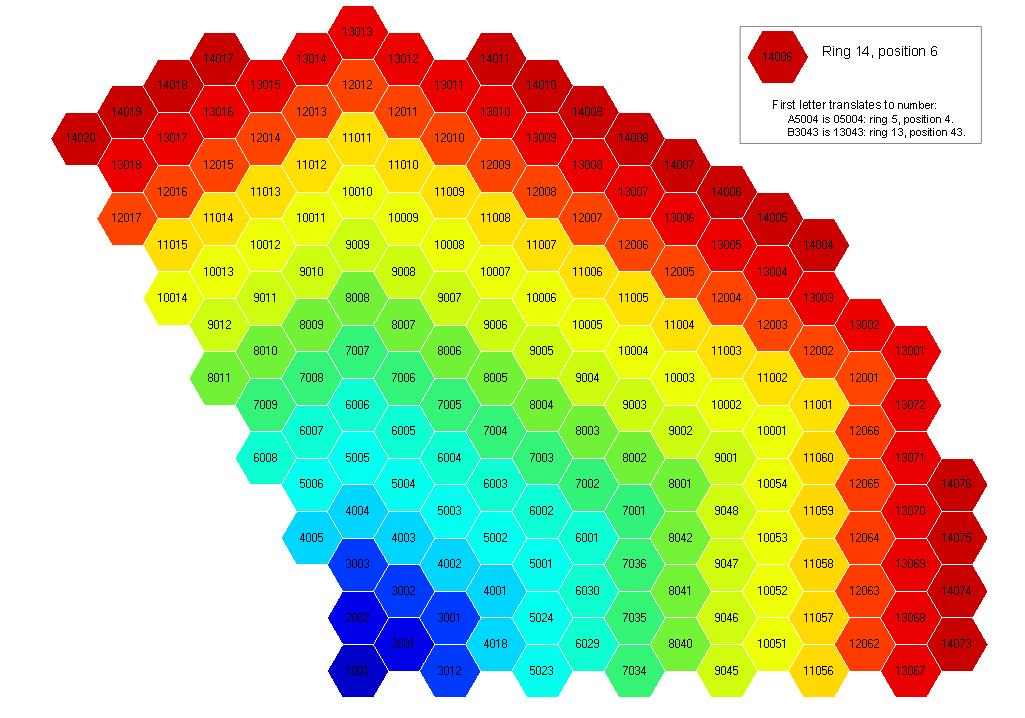
Here are some examples of using a Location object:
loc =  a.getLocationObject()
ring, pos = loc.mainIndices()
x,y = loc.coords(p=assemPitch)
locStr = a.getLocation() # the string representation of a location object
ThetaRZ Location Objects
ARMI can use theta-r-z objects to help it understand cylindrical systems – as opposed to hexagonal systems. However, the radial segment discretizations of a cylindrical mesh are less structured than a hexagonal array. Therefore, to these ThetaRZ location objects use a mesh object to translate integer coordinates to spatial dimensions. Location objects as implemented are best suited for structured grids (e.g. triangular, hexagonal, Cartesian).
Note
Theta-RZ is used instead of the more common RZ-Theta because the DIF3D code uses this convention. In turn, DIF3D uses this convention to allow the same numerical solver algorithms to solve all geometry options consistently. The numerical methods for X and Y plane solutions are analogous to the 2-D theta-R planes, and Z in the final position is consistent between XYZ, Triangular-Z, Hex-Z, and TRZ solvers.
-
armi.reactor.locations.dotProduct(v1, v2)[source]¶ Determines the dot product of two vectors.
- Parameters
v2 (v1,) – Vector represented as an n dimensional tuple
- Returns
- Return type
The dot product of two vectors.
-
armi.reactor.locations.vectorLength(v1, v2=None)[source]¶ Determines the length of a vector
- Parameters
v2 (v1,) – Vector represented as an n dimensional tuple
-
armi.reactor.locations.angleBetweenVectors(v1, v2)[source]¶ Determines the angle between two vectors in radians.
- Parameters
v2 (v1,) – Vector represented as an n dimensional tuple
-
class
armi.reactor.locations.Location(i1=None, i2=None, axial=None, label=None)[source]¶ Bases:
objectAbstract Location object used a as a base class for other concrete definitions.
Instantiate a new Location object.
- Parameters
i1 (int, optional) – 1st coordinate index in core 2d map (ring number in hexes)
i2 (int, optional) – 2nd coordinate in core map (ring position in hex)
axial (str, or int optional) – a letter representing axial slab (‘A’, ‘B’, etc.). If no axial is given, this is a 2D (radial) location
label (str, optional) – A label for this location, e.g. ‘ExCore’, ‘SFP’. If in Location-label format, i1, i2, and axial will be inherited from it. Otherwise, the location will be considered Ex-core
-
__eq__(other)[source]¶ Check equality between locations.
Warning
Because a Location object is mutable, this is NOT guaranteed to be consistent for the same two objects.
-
setAxial(axialIndexOrChar)[source]¶ Axial index used to be a letter A_Z but is now a number 0 through N.
When axial index has to be represented as a single character (e.g. in some global flux solvers), ASCII characters listed in
locations.AXIAL_CHARSare valid.
-
__repr__()[source]¶ Represent the location object as a string.
An example Location is represented as A5002B. The first two digits represent the ring. A5 is actually ring 05. A7 is 07. B3 is 13. The final digit represents the axial location, starting with A at the bottom. The representation starts with a letter because DIF3D doesn’t allow region labels to start with a numeric character, and the original purpose of Location was to be written directly to DIF3D inputs. But you don’t have to convert the name to get the ring number. Just use the Location.mainIndices method.
-
makeLabel()[source]¶ Creates a label based on the location. Something in ring 3, position 10, axial slab 3 will get A3010C
The original purpose of these labels to name DIF3D regions
-
isInSameStackAs(loc)[source]¶ Determines if another location is stacked with this one (for equivalence testing).
-
uniqueInt()[source]¶ Create a unique integer based on the location. Good for adding to SQL databases.
-
fromUniqueInt(uniqInt)[source]¶ Create a location based on the unique int generated above.
ring 30, position 174, axial B would be 3017466.
Notes
Limits: No more than 999 positions, 99 axial positions.
-
fromLabel(label)[source]¶ Set location parameters from a string label.
given a label like A2034B, create a location. This allows the reverse of makeLabel to occur. Given a region name in REBUS, this can figure out where in the core it is. That’s assuming someone set up the REBUS file according to our standards, of course.
A “location label” is in the format 11222A where 11 represents the i1 index, 222 represents the i2 index, and A represents the axial signifier.
- Parameters
label (str) – The label to process.
Examples
>>> loc.fromLabel('A2024')
See also
makeLabel()does the opposite
-
getFirstChar()[source]¶ Converts a ring number into a character since REBUS can’t handle region names that start with numbers.
1 - 9 -> A 10- 19 -> B 20- 29 -> C, etc.
-
mainIndices()[source]¶ This returns the standard (i1, i2) = (ring, pos) hex indices. ring and pos begin with 1 (not 0). Note how this is different than HexLocation.indices, which returns MCNP GEODST indices.
Note that (i, j) refers to (ring, pos) in fluxRecon.py, while (i, j) refers to the MCNP GEODST (grid-like) indices in locations.py. Sorry for any confusion!
- Parameters
None –
- Returns
self.i1, self.i2 – The value of (i2, i2) = (ring, pos) for the HexLocation object.
- Return type
int pair
Examples
>>> loc.mainIndices()
(4, 5)
See also
locations.HexLocation.indices()
-
getDistanceOfLocationToPoint(targetCoords=None, pitch=None)[source]¶ Calculates the distance between the current coordinates and the targetCoords.
This is used to help determine the optimal packing for a core
- Parameters
targetCoords (tuple or HexLocation) – the x, y coordinates that will be compared to current coords of this location
pitch (float) – the pitch of the assemblies
-
getAngle(targetPoint=None, pointOfVectorIntersection=None, pitch=1.0, degrees=False)[source]¶ Determines the angle of this location compared to a targetPoint using a vector intersection point.
The location object coordinates and targetPoint are used with the pointOfVectorIntersection to produce vectors. Using these vectors, the angle between them can be calculated
- Parameters
targetPoint (tuple, location object) – A tuple of the x, y coordinates to be compared with
pointOfVectorIntersection (tuple, location object) – A tuple of the x, y coordinates to be compared with
degrees (bool, optional) – If true, return degrees
-
class
armi.reactor.locations.HexLocation(i1=None, i2=None, axial=None, label=None)[source]¶ Bases:
armi.reactor.locations.LocationSingle location in a regular hexagonal mesh.
This is mutable. It represents a single location at a given time but any instance can be changed to represent any location.
For this reason, whenever storing data for a single location, a tuple (i1, i2, …) should be used instead of the location object.
Instantiate a new Location object.
- Parameters
i1 (int, optional) – 1st coordinate index in core 2d map (ring number in hexes)
i2 (int, optional) – 2nd coordinate in core map (ring position in hex)
axial (str, or int optional) – a letter representing axial slab (‘A’, ‘B’, etc.). If no axial is given, this is a 2D (radial) location
label (str, optional) – A label for this location, e.g. ‘ExCore’, ‘SFP’. If in Location-label format, i1, i2, and axial will be inherited from it. Otherwise, the location will be considered Ex-core
-
fromLabel(label)[source]¶ Set location parameters from a string label.
given a label like A2034B, create a location. This allows the reverse of makeLabel to occur. Given a region name in REBUS, this can figure out where in the core it is. That’s assuming someone set up the REBUS file according to our standards, of course.
A “location label” is in the format 11222A where 11 represents the i1 index, 222 represents the i2 index, and A represents the axial signifier.
- Parameters
label (str) – The label to process.
Examples
>>> loc.fromLabel('A2024')
See also
makeLabel()does the opposite
-
isOnWhichSymmetryLine()[source]¶ Returns a list of what lines of symmetry this is on. If none, returns [] If on a line of symmetry in 1/6 geometry, returns a list containing a 6. If on a line of symmetry in 1/3 geometry, returns a list containing a 3. It seems that only the 1/3 core view geometry is actually coded in here right now.
Ring Edge1 Edge2 Edge3 1 1 1 1 3 12 2 4 5 23 3 7 7 34 4 10 9 45 5 13
-
coords(p=None, rotationDegreesCCW=0.0)[source]¶ Figures out x, y coordinates of this location given a hex pitch p.
-
indicesAndEdge()[source]¶ Return the i, j 0-based indices of a location in a grid as well as the edge.
Like, for instance, in an MCNP repeated geometry grid…
These are called MCNP GEODST coordinates. They look like oblique (angled or bent) x-y coordinates.
From the MCNP5 Manual, VOL2: Figure 4-26, pg. 4-36 or so
So, ring 5, pos 1 becomes (4, 0). Ring 6, pos 2 becomes (4, 1) Ring 3, pos 12 becomes (2, -1) etc.
Notes
This is being replaced by utils.grids.
-
getSymmetricIdenticalsThird(ring=None, pos=None, locClass=None)[source]¶ Find the locations that are symmetric to this one in 1/3 geometry
The number of positions \(N_i\) in hex ring \(i\) is
\[\begin{split}N_i= \begin{cases} 1 & \text{if } i = 0 \\ 6 \times (i-1) & \text{if } i > 0 \end{cases}\end{split}\]There are \(\frac{N_i}{3}\) positions between one position and its 1/3-symmetric position. The symmetric identical are computed accordingly.
Note
If a position is computed that is greater than the maximum number of positions in a ring, the roll-over is computed by subtracting the maximum number of positions.
- Parameters
ring (int, optional) – ring number. Defaults to this location’s ring number
pos (int, optional) – position in ring, defaults to this location’s position number
locClass (Location object, optional) – The location object to instantiate. Defaults to HexLocation
- Returns
otherAssems
- Return type
2 other locations that are identical in 1/3 -symmetry
-
getSymmetricIdenticalsSixth(locClass=None)[source]¶ Returns locations that are identical in 1/6 -symmetry
-
getNumPositions(rings=None)[source]¶ Return The total number of positions in the specified number of rings.
Notes
a single pin counts as 1 ring.
-
getNumRings(nPins, silent=False)[source]¶ Return the number of rings required to hold a specific number of items, rounding up.
-
getNumPinsInLine(rings=None)[source]¶ Return how many pins in a line fit in the center of a hex w/ this many rings.
-
containsWhichFDMeshPoints(resolution=1, fullCore=False, rectangular=False)[source]¶ Compute the difference mesh points contained in a certain location.
When building finite different meshes, a lookup table from mesh point to block is required. This method returns a list of x, y indices that the triangle meshes in this location will have in 1/3 symmetric 120 geometry.
The mesh indices returned will be 2-d (just x and y) and will start at 1.
See Figures 2.4 and 2.6 in the DIF3D manual to understand.
- Parameters
resolution (int, optional) –
- How many subdivisions are made in the side of each hex
1 means there are 6 triangles. 2 means there are 6*4 = 24 3 means there are 6*9 = 54 4 means there are 6*4*4 = 96, etc.
fullCore (bool, optional) – Makes this relevant for full core with DIFNT (but not DIF3D, which uses “cartesian” triangle meshing)
rectangular (bool, optional) – Use the rectangular indexing domain instead of the parallelogram domain.
Notes
DIF3D full core uses a “rectangular” mesh layout while DIFNT full core uses the rhomboid full core mesh layout so for full core DIFNT, use this. For full core DIF3D, use rectangular=True
- If a hex side is broken into d divisions, then there are
4d-1 triangles along the center of the hex in the i direction
2d+1 triangles along the bottom of the hex in the i direction
2d stacks of triangles in the j-direction.
The number of triangles in the i-direction between the first triangle above the centerpoint of two neighboring hexagons is equal to (num center -1)/2 + (num bottom - 1)/2+1, which reduces to 3d.
Results should come out left-to-right, top-to-bottom.
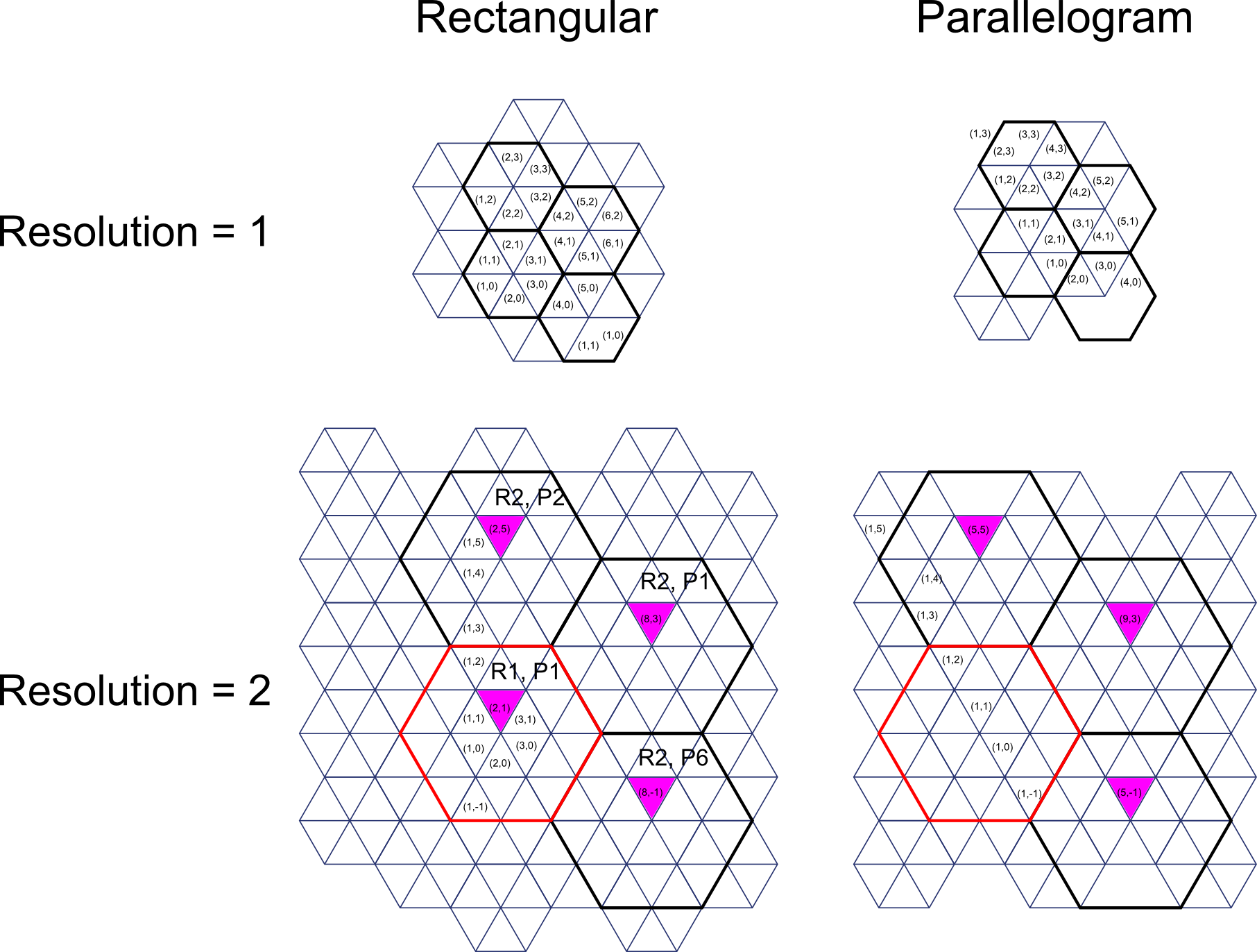
Figure 1. Finite-difference mesh layout of 4 assemblies in locations (1, 1), (2, 1), (2, 2), (2, 6)
-
class
armi.reactor.locations.CartesianLocation(i1=None, i2=None, axial=None, label=None)[source]¶ Bases:
armi.reactor.locations.LocationSingle location in a regular Cartesian grid.
This is mutable. It represents a single location at a given time but any instance can be changed to represent any location.
For this reason, whenever storing data for a single location, a tuple (i1, i2, …) should be used instead of the location object.
Instantiate a new Location object.
- Parameters
i1 (int, optional) – 1st coordinate index in core 2d map (ring number in hexes)
i2 (int, optional) – 2nd coordinate in core map (ring position in hex)
axial (str, or int optional) – a letter representing axial slab (‘A’, ‘B’, etc.). If no axial is given, this is a 2D (radial) location
label (str, optional) – A label for this location, e.g. ‘ExCore’, ‘SFP’. If in Location-label format, i1, i2, and axial will be inherited from it. Otherwise, the location will be considered Ex-core
-
coords(pitchTuple=None, rotationDegreesCCW=0.0)[source]¶ Returns x, y coords of the center of this location, assuming square if only xw is given.
-
class
armi.reactor.locations.ThetaRZLocation(i1=None, i2=None, axial=None, label=None, ThRZmesh=None)[source]¶ Bases:
armi.reactor.locations.LocationLocation that works in 3-D cylindrical geometry.
Note
that this location object only works if there is a ThRZmesh object with directions labeled (‘R’ and ‘Th’)
ThetaRZ location object names represent their discrete position in the mesh object just like in Hexagonal Location Objects. The first two digits represent the azimuthal position, the next three digits represent the radial position and the last digits represents the axial position. For Example, ThetaRZ location A5002B is in the fifth (A5 > 5) azimuthal position, the second radial position (002 > 2) and the second axial (B > 2) position.
use the general location method plus add mesh and Theta RZ specific labels
-
Rcoords()[source]¶ Figures out R coordinates of the center of a Theta-R-Z voxel given theta-R mesh object parameters.
-
ThRcoords()[source]¶ Figures out R, theta coordinates of the center of a Theta-R-Z voxel given theta-R mesh object parameters
-
ThRZcoords()[source]¶ Figures out R, theta and Z coordinates of the center of a Theta-R-Z voxel given theta-R mesh object parameters.
-
radialInner()[source]¶ This method returns the inner radial position of a Theta-R-Z voxel given a Theta-R mesh object.
-
radialOuter()[source]¶ This method returns the outer radial position of a Theta-R-Z voxel given a Theta-R mesh object.
-
thetaInner()[source]¶ This method returns the inner theta position of a Theta-R-Z voxel given a Theta-R mesh object.
-
axialOuter()[source]¶ This method returns the outer axial position of a Theta-R-Z voxel given a Theta-R mesh object.
-
axialInner()[source]¶ This method returns the inner axial position of a Theta-R-Z voxel given a Theta-R mesh object.
-
thetaOuter()[source]¶ This method returns the outer radial position of a Theta-R-Z voxel given a Theta-R mesh object.
-
coords(p=None, rotationDegreesCCW=0.0)[source]¶ Figures out x, y coordinates of the center of a Theta-R-Z voxel given theta-R mesh object parameters.
Notes
p is a dummy variable only there so this method is consistent with the coords method from HexLocation so getDistanceOfLocationToPoint can be defined at the base Location object level
-
getVolume(refHeight=None, axial=None)[source]¶ Return the volume of the radial segment.
- Parameters
refHeight (float) – the height of a radial node in the same units as the locations mesh object
axial (int) – the axial node of the mesh
Notes
adding an axial node will over write a reference height also, there needs to be a ‘Z’-labeled mesh in the mesh object for this to define the height, but you knew that already
-
getInnerRArea(refHeight=None, axial=None)[source]¶ Return the area normal to the r direction on the inside of the radial segment.
- Parameters
refHeight (float) – the height of a radial node in the same units as the locations mesh object
axial (int) – the axial node of the mesh
Notes
adding an axial node will over write a reference height also, there needs to be a ‘Z’-labeled mesh in the mesh object for this to define the height, but you knew that already
-
-
class
armi.reactor.locations.Mesh[source]¶ Bases:
objectThis object helps ARMI define and pass structured orthogonal meshes (X, Y, Z) or (R, Z, Th). When going from X, Y, Z on orthogonal, but non-regular meshes (the pitch isn’t constant) you need to know what the mesh is in order to determine the cartesian coordinates also, you’re not limited to 3 dimensions so this mesh
Rebase meshes such that index 1 is the first index rather than 0 This is accomplished by setting 0 as the first index
Notes
This is intended to be replaced with the newer grids.ThetaRZGrid functionality.
Initilizes mesh object.
self.di dictionary indexed by direction label (‘X’, ‘Y’, etc) of differences self.i dictionary indexed by direction label(‘X’, ‘Y’, etc) of positions
-
getDiLength(label)[source]¶ Rreturns the difference in lengths in the mesh in the direction labeled.
- Parameters
label (string) – The label of the direction (i.e ‘X’, ‘Y’, ‘Theta’, ‘R’, ‘Z’, ‘E’)
-
getDi(n=None, label=None)[source]¶ Returns the n-th difference in lengths in the mesh in the direction labeled.
- Parameters
n (integer) – The index of position with in mesh structure.
label (string) – The label of the direction (i.e ‘X’, ‘Y’, ‘Theta’, ‘R’, ‘Z’, ‘E’)
-
getUpper(n=None, label=None)[source]¶ Returns the outer position of the n-th element in the mesh in the direction labeled.
- n: integer
The index of position with in mesh structure
- label: string
The label of the direction (i.e ‘X’, ‘Y’, ‘Theta’, ‘R’, ‘Z’, ‘E’)
-
getUpperLowerFromPosition(p=None, label=None, sigma=1e-07)[source]¶ Get the upper and lower interface indexes for a given position in a given direction.
p is the position in the direction labeled label is the string name of the target directions label.
-
getClosestUpperFromPosition(p=None, label=None)[source]¶ Returns the closest position in the mesh in the direction labeled, label.
-
addFromDeltas(deltas=None, labels=None)[source]¶ Define mesh(s) in the labeled direction(s).
- Parameters
deltas (a list, either a list of lists or a single list of mesh differences (like heights in an assembly)) –
labels (a string or list of strings of the labels (i.e 'X', 'Y', 'Theta', 'R', 'Z', 'E') of directions) –
Notes
If you want to define multiple directions in one command then deltas should be a list of lists, and there should be a label for every direction and the order of labels and deltas should be lined up.
-
addFromPositions(positions=None, labels=None)[source]¶ Define mesh(s) in the labeled direction(s).
- Parameters
positions (list) – Either a list of lists or a single list of mesh positions
labels (a string or list of strings of the labels (i.e 'X', 'Y', 'Theta', 'R', 'Z', 'E') of directions) –
Notes
If you want to define multiple directions in one command then positions should be a list of lists, and there should be a label for every direction and the order of labels and positions should be lined up
-
addFromRegularIntervals(dIs=None, Ns=None, labels=None)[source]¶ Defines regular intervals mesh(s) in the labeled direction(s).
- Parameters
dIs (a float or a list of floats of the regular difference (think pitch)) –
labels (a string or list of strings of the labels (i.e 'X', 'Y', 'Theta', 'R', 'Z', 'E') of directions) –
Ns (a float or a list of floats of the number of elements in the mesh) –
Notes
If you want to define multiple directions in one command then dIs and Ns should be a list, and there should be a label for every direction and the order of labels, dIs and Ns should be lined up
-
addFromMaximums(Maxs=None, Ns=None, labels=None)[source]¶ Defines regular intervals mesh(s) in the labeled direction(s) from a maximum position and number of nodes.
- Parameters
Maxs (a float or a list of floats of the regular difference (think pitch)) –
labels (a string or list of strings of the labels (i.e 'X', 'Y', 'Theta', 'R', 'Z', 'E') of directions) –
if you want to define multiple directions in one command then deltas should be a list of lists, ((note)) –
there should be a label for every direction and the order of labels and deltas should be lined up (and) –
-
addOneDirectionFromDeltas(deltas=None, label=None)[source]¶ Defines regular intervals mesh in a single direction.
- Parameters
deltas (a list of mesh differences (like heights in an assembly)) –
label (a string of the labels (i.e 'X', 'Y', 'Theta', 'R', 'Z', 'E') of directions) –
-
addOneDirectionFromPositions(positions=None, label=None)[source]¶ Defines regular intervals mesh in a single direction.
- Parameters
positions (a list of mesh positions) –
label (a string of the labels (i.e 'X', 'Y', 'Theta', 'R', 'Z', 'E') of directions) –
-
addOneDirectionFromRegInterval(dI=None, N=None, label=None)[source]¶ Defines regular intervals mesh in a single direction.
- Parameters
dI (the standard regular interval) –
N (the number of elements in a mesh) –
label (a string of the labels (i.e 'X', 'Y', 'Theta', 'R', 'Z', 'E') of directions) –
-
addRegDirectionFromMax(L=None, N=None, label=None)[source]¶ Defines regular intervals mesh in a single direction based on the maximum position.
- Parameters
Maximum (the maximum position on a mesh (think height of an assembly)) –
N (the number of elements in a mesh) –
label (a string of the labels (i.e 'X', 'Y', 'Theta', 'R', 'Z', 'E') of directions) –
-
checkMesh(label=None)[source]¶ This ensures that 0 is included in the mesh.
Notes
If the mesh includes both negative and positive values it doesn’t need to have a 0 position, otherwise its inferred that you need a 0 position and this helps you generated it
-
appendUpper(label=None, p=None)[source]¶ This method adds an additional position in the I vector to a given direction.
Examples
If you are defining a grid you can define an additional stack of elements with a verticle mesh that doesn’t align with the initial mesh and use this method to fill in the gaps and update the differences.
-
appendFromBounds(label=None, p1=None, p2=None, n=None)[source]¶ Adds mesh points from bounds (upper and lower) and number of cells between the bounds.
- Parameters
label (string) – direction label
p1 (float) – inner position
p2 (float) – outer position
n (int) – number of cells between the bounds
See also
armi.reactor.reactors.findAllAziMeshPoints(),armi.reactor.reactors.findAllRadMeshPoints()
-
getThRLocations()[source]¶ This method returns a list of location objects for each node bound by the positions in the mesh.
———– I[‘R’][r+1] | | | |
- I[‘Th’][t]| Location | I[‘Theta’][t+1]
|[t+1][r+1]| | | ————I[‘R’][r]
-
getThRZLocationsFromBounds(r1=None, r2=None, t1=None, t2=None, z1=None, z2=None, units='Radians', sigma=0.0001)[source]¶ This method returns a list of locations bounded by defined surfaces.
- Parameters
r1 (float) – inner radius of control volume
r2 (float) – outer radius of control volume
t1 (float) – inner azimuthal location of control volume
t2 (float) – inner azimuthal of control volume
z1 (float) – inner axial location of control volume
z2 (float) – inner axial of control volume
units (string) – flag to use either radians (default) or degrees
sigma (float) – acceptable relative error (i.e. if one of the positions in the mesh are within this error it’ll act the same if it matches a position in the mesh)
-
-
class
armi.reactor.locations.Line[source]¶ Bases:
object-
sense(cartesian)[source]¶ This method returns the ‘sense’ of a cartesian point (x, y) with respect to the line. The sense of a point is useful in establishing whethor or not a point is within a defined area or volume.
- Parameters
cartesian (tuple-like of float-like) – the first element is the x-coordinate and the second element is the y-coordinate
- Returns
sense – this can be negative (inside) positive (outside) or zero (actually on the line, the cartesian point satisfies the polynomial equation)
- Return type
float
-
getY(x=0)[source]¶ This method returns the a list of y-values that satisfy the polynomial equation of this line by using the quadratic formula.
- Parameters
x (float-like) – x-coordinate
- Returns
sense – The solutions to the polynomial equation, this method returns [None] if there are no real intercepts and ‘inf’ if there are this is a constant value line (c=0)
- Return type
[y1, (y2)]
-
getX(y=0)[source]¶ This method returns the a list of x-values that satisfy the polynomial equation of this line by using the quadratic formula.
- Parameters
y (float-like) – y-coordinate
- Returns
sense – The solutions to the polynomial equation, this method returns [None] if there are no real intercepts and ‘inf’ if there are this is a constant value line (c=0)
- Return type
[x1, (x2)]
-